


The Browser AI Stack Big Tech Spent $1B+ Trying to Regulate Away
How WASM + WebGPU + WebLLM quietly made it possible to run real AI — models, agents, the whole thing — directly in the browser. No cloud. No API key. And why that’s making a lot of very powerful people nervous.
- A converging stack of WebAssembly 3.0, WebGPU, and frameworks like WebLLM now lets developers run quantized LLMs, multiagent pipelines, and ML inference entirely client-side — zero server required.
- Big Tech lobbied over $36M in H1 2025 alone to impose a 10-year moratorium on state AI regulation. Congress blocked it 99-1, but three more attempts followed (NDAA, EO, H.R. 5388).
- The connection is real: decentralized browser AI erodes the cloud revenue that funds the lobbyists fighting to control AI governance.
- WebGPU-accelerated inference now hits ~10 tokens/second for 1B-parameter models in Chrome — fast enough for genuinely useful apps.
- You can build this stack today. This guide shows you exactly how.
The Context Nobody’s Connecting
Let me start with the numbers, because they tell the story faster than anything else.
These numbers live in separate news cycles. Tech reporters cover the lobbying. Developer blogs cover WebAssembly. Nobody’s putting them in the same room. That’s what this piece is for.
The browser AI stack — WASM, WebGPU, WebLLM — is genuinely threatening to something. Not in a conspiratorial sense, but in a straightforward business sense: if developers can run capable AI models locally without touching a cloud API, Amazon, Google, and Microsoft lose a revenue stream. The lobbying fight isn’t about safety. It’s about market control. And the technology is quietly winning.
The Stack, Explained Honestly
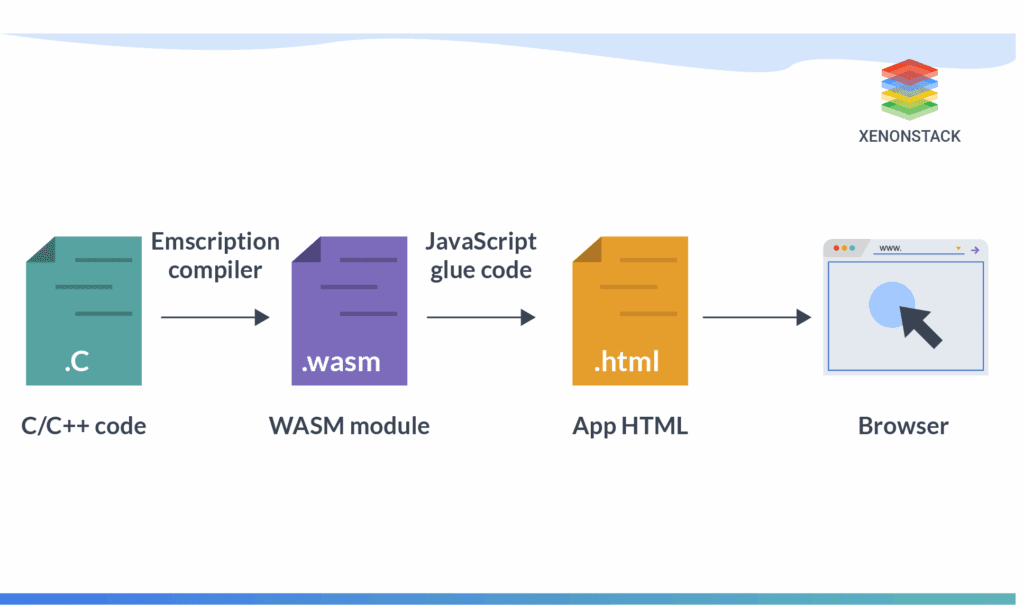
There’s no single “forbidden script.” The original framing is a bit clickbait-y. What actually exists is a combination of open standards that, assembled correctly, are genuinely disruptive. Here’s the real architecture:
Agent orchestration logic
Embeddings, classification
Non-blocking UI
WASI-NN, SIMD, Memory64
Shader pipelines for inference
Each layer is a real, standardized, W3C-backed technology. Nothing here is underground. The combination is what’s powerful — and what wasn’t possible even two years ago.
WebAssembly 3.0: The Foundation Just Got Bigger
WebAssembly 3.0 finalized in September 2025, and the change that matters most for AI is Memory64. The old 4GB per-module ceiling was a genuine killer for large model weights. Memory64 blows that open — theoretically up to 16 exabytes of addressable space, with browser implementations currently supporting up to 16GB per tab. That means a quantized 7B-parameter model, which in INT4 format runs around 3.5GB, can finally fit in a single WASM module’s address space.
Beyond that, Wasm 3.0 ships native garbage collection for managed languages (which is why you can now run Go and Kotlin in the browser at near-native speeds), native exception handling, and multi-memory support. Debugging got serious too — DWARF support means you can step through Rust code running in the browser from VS Code. It’s not a toy platform anymore.
WebGPU: The Reason This Becomes Real
This is the piece that changed everything. WebGPU isn’t a graphics API that happens to support compute — it’s a proper compute interface with shader pipelines designed for workloads like matrix multiplication. For AI inference, that matters enormously. The difference between WebGPU and CPU-based WASM inference is night and day: Chrome hitting around 10 tokens per second for a 1B-parameter model is fast enough to feel responsive. Without WebGPU, you’re waiting seconds per token.
The performance hierarchy in 2026 looks roughly like this:
⚠ Research from the 2025 International Symposium on High-Performance Parallel and Distributed Computing found average latency gaps of 16.9× (CPU) and 30.6× (GPU) between in-browser and native inference. The browser isn’t native. But for the right tasks, it’s close enough to be useful.
WebLLM and Transformers.js: The Developer Interface
WebLLM (from the MLC AI team at CMU) is the most production-ready piece of the puzzle for language models. It natively supports Llama 3, Phi-3, Gemma, Mistral, and Qwen — and a 2026 paper from the team (Ruan et al., arXiv 2412.15803) documents the architecture properly. You install it via npm, call CreateMLCEngine(), and you’re running inference.
Transformers.js from Hugging Face is the better entry point for everything else: embeddings, classification, image recognition, audio transcription. It mirrors the Python transformers API almost exactly — same model IDs, same pipeline abstractions. If you’ve used the Python library, you’re five minutes from running inference in the browser.
ONNX Runtime Web sits in between: more model format flexibility, slightly more configuration, production-proven in enterprise contexts. Pick it if your team already has ONNX models in the pipeline.
How to Actually Build This
Enough theory. Here’s the minimal working pattern, adapted from current production implementations.
Step 1: Detect What the Browser Supports
Don’t hardcode your backend. Check what’s available and degrade gracefully. This backend detection function has become standard across teams building browser AI:
// Detect optimal inference backend at runtime
async function chooseBackend() {
  // Prefer WebGPU — check it's real hardware, not software fallback
  const adapter = await navigator.gpu?.requestAdapter();
  if (adapter && !adapter.isFallbackAdapter) {
    return { backend: 'webgpu', dtype: 'q4f16' };
  }

  // SIMD-capable WASM is 2-4x faster than plain FP32
  const simd = WebAssembly.validate(new Uint8Array([
    0, 97, 115, 109, 1, 0, 0, 0, 1, 5, 1, 96, 0, 1, 123,
    3, 2, 1, 0, 10, 10, 1, 8, 0, 65, 0, 253, 15, 253, 98, 11
  ]));

  return { backend: 'wasm', dtype: simd ? 'q8' : 'fp32' };
}
Step 2: Load Your Model in a WebWorker
This is the piece most tutorials skip: run everything in a WebWorker, not on the main thread. Model loading takes seconds. If you block the main thread, the UI freezes. Off-thread execution keeps the app responsive while a 2GB model initializes:
// worker.js — runs off the main thread
import * as webllm from "https://esm.run/@mlc-ai/web-llm";

let engine = null;

self.onmessage = async (e) => {
  const { type, payload } = e.data;

  if (type === 'init') {
    engine = await webllm.CreateMLCEngine(
      'Phi-3.5-mini-instruct-q4f16_1-MLC',
      { initProgressCallback: (p) => self.postMessage({ type: 'progress', payload: p }) }
    );
    self.postMessage({ type: 'ready' });
  }

  if (type === 'infer' && engine) {
    const reply = await engine.chat.completions.create({
      messages: payload.messages,
      stream: true
    });
    // Stream tokens back to main thread as they arrive
    for await (const chunk of reply) {
      self.postMessage({ type: 'token', payload: chunk.choices[0].delta.content });
    }
    self.postMessage({ type: 'done' });
  }
};
Step 3: Choose the Right Model for the Job
Model selection is where most first-time builders get this wrong. Bigger is not better — it’s just slower. The practical size guide for 2026:
| Model Size | Backend | Use Cases | First-Load Time |
|---|---|---|---|
| <100M params Embeddings, classifiers |
WASM CPU | Sentiment analysis, semantic search, intent detection | ~1-3s |
| 100M – 1B params Phi-3.5 Mini, Gemma 1B |
WebGPU preferred | Autocomplete, summarization, Q&A, code assist | ~15-30s first load, cached after |
| 1B – 4B params Llama 3.2 3B, Qwen 2.5 |
WebGPU required | More complex reasoning, multi-turn conversation | ~45-90s first load |
| 4B+ params | WebGPU + Memory64 | Only on high-VRAM devices; use hybrid approach otherwise | Minutes; consider server fallback |
Multiagent Systems in the Browser
The single-model case is interesting. Multiagent pipelines running entirely client-side are where it gets genuinely strange — and genuinely useful.
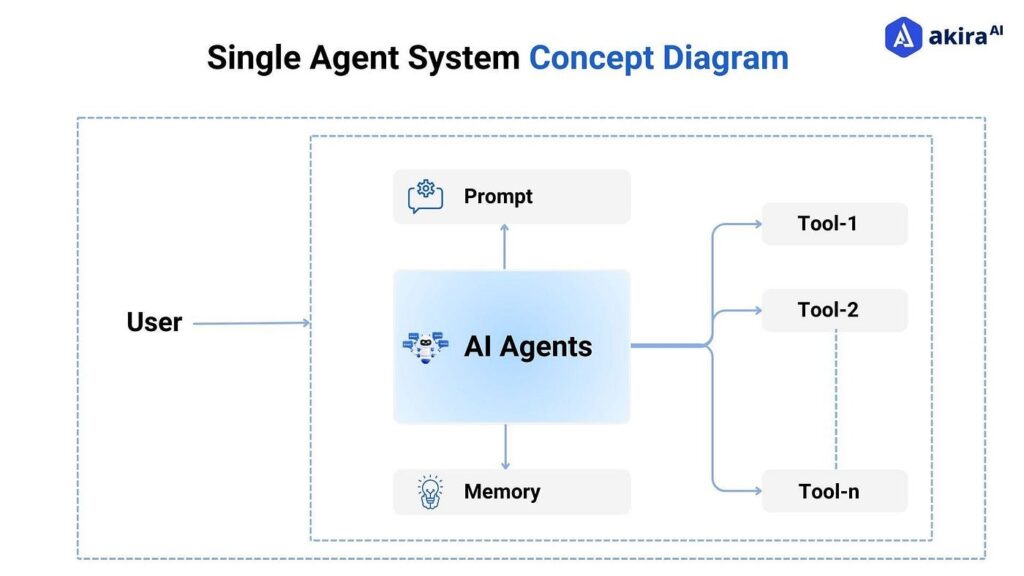
The architecture that’s emerging works like this: WebLLM handles model inference in one WebWorker. A separate WASM module (compiled from Rust or Go) handles the agent orchestration logic — parsing tool calls, managing state, routing between agents. WebWorkers coordinate everything through a message-passing layer, essentially an in-browser pub/sub system. The main thread just renders UI.
A practical example: imagine a code review agent that runs offline. One agent reads your file, another runs a WASM-compiled static analysis tool, a third drafts the explanation. No telemetry, no API keys, no sending your private codebase to a third party. This architecture works today — not as a demo, but in production-grade developer tooling.
The Mozilla AI team’s February 2026 writeup on the “3W stack” (WebLLM + WASM + WebWorkers) shows this actually running with multiple language runtimes — Rust, Go, Python via Pyodide, and JavaScript — all orchestrating a shared model. The result, in their words, is “surprisingly capable: agents that work offline, keep data completely local, and respond faster than you’d expect.”
The Privacy Case Is Genuine (With Caveats)
Let me be honest about this, because the privacy claim gets oversold. The core of it is real: when user data never leaves the device, the data processing obligations that arise from transmitting personal data to a server are eliminated for the inference step. GDPR compliance gets structurally simpler. HIPAA gets structurally simpler. You’re not making API calls with patient data. That’s meaningful.
But “structurally simpler” isn’t “automatically compliant.” Legal compliance still depends on model provenance, browser storage practices, logging, and the full application architecture. Talk to qualified counsel before marketing a health app as GDPR-compliant because it uses client-side inference.
The surveillance capitalism angle is real too, just more subtle. Cloud-based inference is one of the primary mechanisms through which usage data flows back to Big Tech. Every API call is a data point. Browser-local inference removes that data flow entirely. That’s not paranoia — it’s how the business models work.
| Concern | Cloud API Inference | Browser-Local Inference |
|---|---|---|
| Data leaves device | Always | Never (for inference step) |
| API key required | Yes | No |
| Works offline | No | Yes (after model cached) |
| Usage telemetry to provider | Yes (typically) | None |
| Server cost | Ongoing $$ | Zero (shifts to client hardware) |
| First-load latency | Near-zero | Significant (model download) |
| Max model capability | Unlimited (GPT-4, Claude Opus) | ~4B params practical; 7B+ on high-end hardware |
| GDPR data processing obligations | Full (server-side) | Reduced for inference step |
The Regulation Fight: What Actually Happened
The lobbying story needs accurate retelling, because the original framing — “Big Tech banned this script” — is sensationalist. What actually happened is more interesting and more troubling.
Eight major tech firms (Meta, Alphabet, Microsoft, Amazon, and others) spent a combined $36 million on federal lobbying — roughly $320,000 per day Congress was in session. Meta alone hit a record $13.8M in H1 2025. Nvidia’s spend jumped 388% year-over-year.
Senator Ted Cruz attempted to insert a 10-year moratorium on state AI regulation into the “One Big Beautiful Bill” reconciliation package. The specific mechanism: states that passed AI regulations would lose federal broadband funding. The Senate voted 99-1 to strip it out.
Congressional leaders tried to attach AI preemption to the National Defense Authorization Act for FY2026, framing state regulations as a threat to military-commercial AI partnerships. When that failed, H.R. 5388 — the “American Artificial Intelligence Leadership and Uniformity Act” — was introduced, with an explicit temporary moratorium on state AI laws. Both stalled.
President Trump signed “Ensuring a National Policy Framework for Artificial Intelligence,” directing the DOJ to challenge state AI laws deemed “burdensome” and conditioning federal broadband funding on state compliance. Colorado’s algorithmic discrimination law — effective February 2026 — was explicitly criticized. The effective date was later delayed to June 30, 2026.
With the federal moratorium dead, over 1,000 state AI bills remain active. California’s AB 2013 (training data transparency) took effect January 2026. New York’s RAISE Act targets high-compute models. Colorado and Texas laws are advancing. State AGs are preparing to challenge the Executive Order on Tenth Amendment grounds.
Here’s what connects this to browser AI: the regulation being fought over is primarily aimed at large centralized AI systems — frontier models, cloud deployments, high-compute training runs. Browser-local inference falls outside most of these frameworks almost by definition. A model running on a user’s device, never transmitted anywhere, processing no one else’s data, is structurally difficult to regulate under the current drafts.
That’s not an accident. It’s why the technical stack and the policy fight are two sides of the same coin.
What This Stack Can’t Do (Yet)
I’ve seen enough hype cycles to want to be straight here. The browser AI stack is genuinely powerful — and it has real ceilings.
The 70B model problem. It’s not happening in a browser tab in any foreseeable future. The relevant question isn’t “can this run GPT-4?” It’s “can this run a model good enough for my specific task?” For classification, summarization, autocomplete, code assist, and RAG over small corpora — the answer in 2026 is yes. For complex multi-step reasoning over long contexts — not yet.
First-load latency is real. A 2GB model download on first use is a significant UX burden. Browser caching via the Cache API helps — the second load is fast. But that first experience matters. Design for it explicitly: progress bars, useful fallback behavior, honest messaging about what’s happening.
Hardware variance is brutal. The 2025 ISPASS benchmark data found prediction latency varying 28.4× across devices on the WASM backend. An app that runs beautifully on a 2024 MacBook Pro may crawl on a budget Android tablet. Test on real hardware diversity, not just your development machine.
Safari is still the weakest link. Full Wasm 3.0 support is still rolling out on Safari/WebKit. The SIMD and Memory64 features you need for good AI performance have uneven support. If you have a significant Safari audience, implement aggressive fallbacks.
Getting Started: The Honest Path
If you want to build something real with this stack, here’s the sequence that actually works — not the version that looks clean in a blog post:
- Start with Transformers.js for non-LLM tasks. Embeddings, classification, audio transcription — all production-stable, sub-100MB models, works on WASM CPU without WebGPU. Ship this first.
- Use WebLLM for language model work. Import via npm or CDN, run in a WebWorker, stream tokens to your UI. The API mirrors OpenAI’s — migration later is straightforward if you need it.
- Implement the backend detection pattern. Don’t hardcode WebGPU or WASM. Detect at runtime, select the best available option, handle the fallback gracefully. The chooseBackend() function from earlier in this piece is a solid starting point.
- Use the Cache API for model weights.
caches.open('models').then(...)— store the weights locally after first download. Users should never download a 2GB model twice. - Test on real hardware variety. Budget Android, mid-range Windows laptop, older iPhone. The variance is real and it will surprise you.
- Design for the first-load experience explicitly. Show real progress. Give the user something useful to do while the model initializes. Don’t just show a spinner.
- Consider ONNX Runtime Web if you have existing ML models. Broader format support, good enterprise track record, active development.
- Watch WASI 0.3. Async WASI will significantly clean up the multiagent architecture. It’s expected in 2026 — build your agent orchestration layer with that in mind.
The Bigger Picture
The browser AI stack isn’t going to replace cloud AI. That’s not the point. What it’s doing is creating a viable alternative for a class of applications where cloud AI was never the right tool — applications involving sensitive data, offline use cases, cost-sensitive deployments at scale, or use cases where the developer simply doesn’t want to hand user data to a third party.
The fact that Big Tech is fighting hard to control AI regulation at the state level isn’t evidence that browser AI is “banned” or “forbidden.” It’s evidence that the industry recognizes how the incentive structures work. Cloud AI is a revenue stream. Decentralized browser AI is a threat to that revenue stream. The lobbying is a natural response.
What’s interesting is that the technology is winning anyway. WebAssembly 3.0 shipped. WebGPU is in all major browsers. WebLLM runs Phi-3 and Gemma at usable speeds on consumer hardware. The open-source ML ecosystem keeps producing smaller, more capable, more efficiently quantized models. The gap between “possible in a browser” and “possible in the cloud” is narrowing every quarter.
The regulatory landscape in 2026 is a mess of competing state laws, failed federal moratoriums, and an executive order with contested constitutional standing. That uncertainty cuts both ways — it creates compliance risk for large centralized AI deployments, while browser-local inference largely sidesteps the debate. For developers building privacy-first applications, that’s not a bug in the current moment. It’s a feature.
Build carefully. Understand the limits. And pay attention to what happens with WASI 0.3 — it’s the next inflection point for how capable this stack can become.
Primary Sources
https://www.neuralgrimoire.com/blog/